Site search optimization is the practice of improving a website’s internal search engine to deliver fast, relevant, and accurate results that help users find what they need and convert at higher rates. Unlike what is search engine optimization, which targets external discovery on Google or Bing, site search optimization focuses entirely on the experience after a visitor lands on your site. Shoppers who use site search convert at rates 2 to 3 times higher than passive browsers, generating 40%–60% of ecommerce revenue. That single statistic explains why marketing professionals and website owners can no longer treat internal search as a secondary concern.
What is site search optimization and why does it matter?
Site search optimization is the systematic process of tuning your website’s internal search system so it understands user intent, handles imperfect queries, and surfaces the right content or products every time. The industry often calls this onsite search optimization or internal search optimization, and both terms describe the same discipline.
The business case is direct. Site search users generate roughly 30% of site traffic but account for 40%–60% of revenue on average ecommerce sites. These are your highest-intent visitors. They already know what they want. Your job is to remove every obstacle between their query and the result.

The core levers include autocomplete, typo tolerance, synonym mapping, faceted filtering, and analytics-driven relevance tuning. Each one addresses a specific failure point in the search experience. Together, they transform a basic keyword-matching tool into a decision engine that processes language, user behavior, and business rules simultaneously.
How does site search optimization improve user experience?
Fast, relevant results are the foundation of a good onsite search experience. If search results aren’t delivered within 3 seconds, most users abandon the site entirely. Slow internal search pushes visitors directly to Google, where they may find a competitor instead.
Beyond speed, the following features reduce friction and keep users engaged:
- Autocomplete and predictive search surface suggestions as users type, shortening the path from intent to result.
- Typo tolerance catches misspellings like “blakc dress” or “laptpo” and still returns relevant results.
- Synonym handling maps everyday language to your internal taxonomy, so a user searching “couch” finds results tagged “sofa.”
- Faceted filtering lets users narrow results by size, price, brand, or category without starting a new search.
- Zero-result recovery redirects users who hit a dead end toward related categories or live support instead of a blank page.
Each feature solves a specific drop-off point. Autocomplete reduces typing effort. Typo tolerance prevents dead ends from spelling errors. Synonym handling closes the gap between how users talk and how your catalog is labeled.
Pro Tip: Track your site’s zero-result rate weekly. A rate above 10% signals a serious relevance problem that is costing you conversions right now.
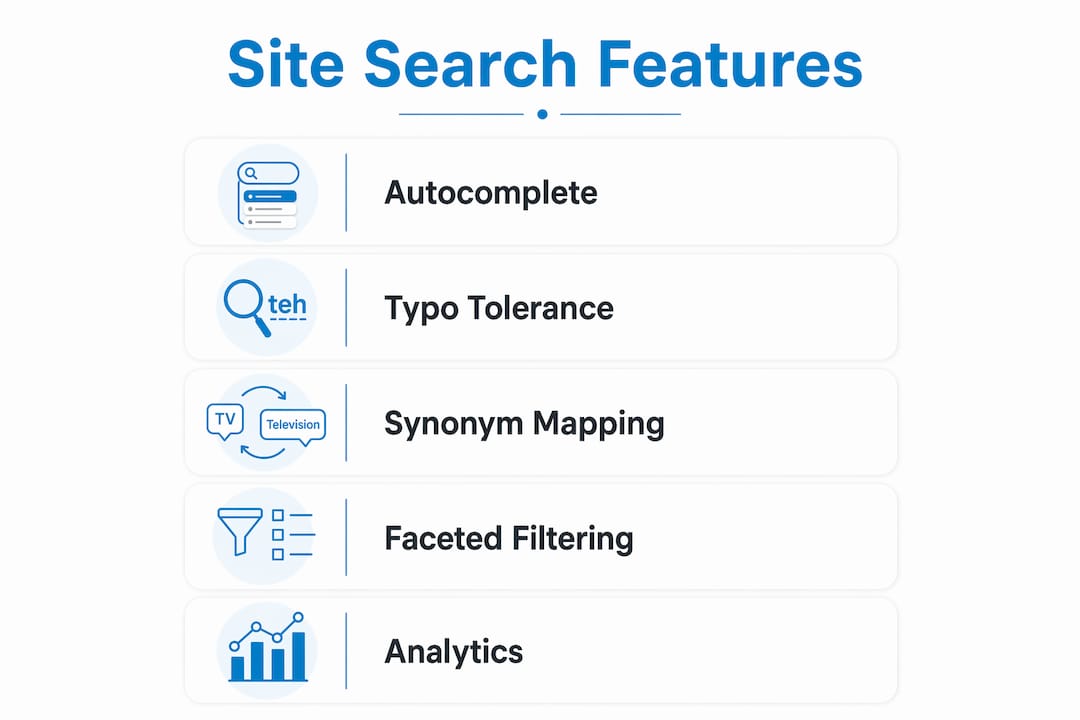
The cumulative effect is a search experience that feels intuitive. Users find what they need faster, bounce less, and return more often. That is the direct link between search quality and user retention.
What technical features drive effective site search strategies?
Implementing the right technical features is where site search best practices move from theory to measurable results. Here are the six highest-impact areas to address:
- Autocomplete configuration. Autocomplete and predictive search can boost conversion rates by 24% by reducing typing friction. Configure suggestions to prioritize high-converting queries, not just popular ones.
- Typo tolerance tuning. Typo tolerance should be configured dynamically by query length. For short queries of one to three characters, allow zero edits to avoid false matches. For longer queries, allow up to two character edits. Flat tolerance settings cause irrelevant results for short queries and missed matches for long ones.
- Synonym bridge maintenance. Vocabulary mismatch between user queries and internal terms is one of the most common causes of search frustration. Maintain a living synonym dictionary that maps user language to your product taxonomy. “Sneakers” should return the same results as “athletic shoes.”
- Faceted filtering. Filters by price, brand, size, and category let users self-segment results without reformulating queries. This is especially critical for ecommerce sites with large catalogs.
- Zero-result page management. Zero-result searches significantly reduce conversions. Keep your zero-result rate below 5% by actively recovering failed searches with related category suggestions, popular products, or a live chat prompt.
- Search analytics monitoring. Using analytics to monitor zero-result queries weekly reveals optimization opportunities that would otherwise stay invisible. Track top queries, failed queries, and click-through rates from search results pages.
| Feature | Primary Benefit | Implementation Priority |
|---|---|---|
| Autocomplete | Reduces typing effort, lifts conversions by 24% | High |
| Typo tolerance | Prevents dead ends from misspellings | High |
| Synonym mapping | Closes language gap between users and catalog | High |
| Faceted filtering | Helps users refine large result sets | Medium |
| Zero-result recovery | Reduces lost conversions from failed searches | High |
| Search analytics | Identifies gaps for continuous improvement | Medium |
Pro Tip: Export your top 50 zero-result queries each month and use them to build new synonym pairs or create missing content. This single habit compounds into significant relevance gains over time.
What pitfalls should you avoid when optimizing site search?
Most site search problems trace back to a handful of recurring mistakes. Knowing them in advance saves significant time and budget.
- Messy product data. Poor data structure and messy product metadata are the leading causes of irrelevant search results, even when the underlying algorithm is strong. Clean, consistent metadata is a prerequisite, not an afterthought.
- Ignoring vocabulary gaps. Many teams build their catalog using internal terminology that real users never type. Without a synonym bridge, a user searching “TV stand” on a site that catalogs the product as “media console” gets zero results.
- Flat typo tolerance settings. Applying the same edit distance to a two-character query and a fifteen-character query produces poor results at both ends. Dynamic configuration by query length is the correct approach.
- Neglecting zero-result analysis. Zero-result queries are direct evidence of where your search fails. Ignoring them means repeating the same failures indefinitely.
- Treating search as a purely technical project. Site search sits at the intersection of content strategy, product taxonomy, and user behavior. Handing it entirely to IT without input from marketing and content teams produces a technically functional but commercially ineffective system.
Pro Tip: Run a quarterly audit of your synonym dictionary. User language evolves with trends, seasons, and new product categories. A synonym list built two years ago is already outdated.
The most expensive mistake is treating the initial configuration as a finished product. Site search requires ongoing tuning, the same way a paid search campaign requires ongoing bid management.
How does site search optimization drive conversions and revenue?
The revenue case for investing in site search is stronger than most marketing teams realize. The numbers are not marginal improvements. They represent a structural advantage.
Search users are high-intent visitors. They arrive knowing what they want and use the search bar to find it directly. Compare that to a passive browser who may click through several category pages before deciding. The conversion rate difference reflects that intent gap.
| Metric | Search Users | Passive Browsers |
|---|---|---|
| Conversion rate | 4%–6% | 1%–2% |
| Revenue share | 40%–60% | 40%–60% |
| Traffic share | ~30% | ~70% |
The table shows a clear imbalance. A minority of users generate the majority of revenue. Optimizing the experience for that minority delivers outsized returns relative to the investment.
Beyond direct conversion lift, site search data is one of the most underused inputs in content and product strategy. Your top search queries tell you exactly what users want but cannot find. That list is a direct brief for new product pages, blog content, or catalog expansions.
Merchandising rules add another layer. You can configure your search engine to surface high-margin products, promotional items, or new arrivals for specific queries. A user searching “summer dresses” can be shown your current sale items first, without any change to the underlying catalog. This is where ecommerce SEO practices and internal search strategy overlap most directly.
Personalization takes this further. Search engines that factor in browsing history, past purchases, or location can tailor results to individual users. A returning customer who previously bought running shoes sees different results for “shoes” than a first-time visitor. That relevance lift translates directly into higher average order values.
Site search as a strategic asset, not a feature
Most teams I work with treat site search as a checkbox. They install a search plugin, confirm it returns results, and move on. That approach leaves significant revenue on the table.
The reality is that effective ecommerce search anticipates user needs rather than just matching keywords. That distinction requires ongoing work. It requires someone reviewing zero-result queries every week, updating synonym dictionaries every quarter, and testing relevance tuning against real conversion data.
The teams that get this right treat search as a cross-functional responsibility. Marketing owns the synonym dictionary and merchandising rules. IT owns the infrastructure and speed. Content teams own the product data quality. When those three functions operate in silos, search degrades. When they collaborate around a shared set of search performance metrics, it compounds.
The other thing I have seen consistently: companies that invest in site search reduce their dependence on paid acquisition. When your internal search converts at 4%–6%, you need fewer paid clicks to hit the same revenue targets. That is a structural cost advantage that compounds over time. For any site running ecommerce SEO strategies, internal search is the highest-leverage place to invest after the foundational technical work is done.
— Anil
How Seotonic can help you improve search functionality
Seotonic brings over 20 years of experience and more than 3,000 successful global campaigns to the challenge of site search and technical SEO. If your internal search is returning irrelevant results, generating high zero-result rates, or failing to convert high-intent visitors, the problem is almost always a combination of data quality, configuration gaps, and missing analytics processes.

Seotonic’s ecommerce SEO services cover the full stack: technical audits, product data optimization, synonym strategy, and ongoing performance monitoring. The team also connects internal search improvements to broader SEO and business growth goals, so every optimization compounds across both your site search and your organic rankings. If you are ready to turn your internal search into a revenue driver, Seotonic has the process to get you there.
FAQ
What is site search optimization in simple terms?
Site search optimization is the process of improving your website’s internal search engine so users find relevant results faster. It involves features like autocomplete, typo tolerance, and synonym mapping to reduce failed searches and increase conversions.
How is site search optimization different from SEO?
SEO targets external search engines like Google to drive traffic to your site. Site search optimization improves the search experience within your site after visitors arrive, focusing on relevance, speed, and conversion rather than external rankings.
What is a good zero-result rate for site search?
A zero-result rate above 10% is a red flag that signals serious relevance problems. The target is below 5%, achieved through active synonym management, content gap filling, and zero-result recovery strategies.
How does autocomplete improve site search performance?
Autocomplete reduces typing effort and surfaces relevant suggestions before users finish their query. Predictive search features can boost conversion rates by 24% by shortening the path between search intent and the result.
How often should you audit your site search settings?
Review zero-result queries weekly and update your synonym dictionary quarterly. Search behavior shifts with seasons, trends, and catalog changes, so static configurations degrade in relevance over time.
Key takeaways
Site search optimization delivers the highest ROI when it combines clean product data, dynamic typo tolerance, active synonym management, and weekly analytics review into a continuous improvement process.
| Point | Details |
|---|---|
| Search users drive outsized revenue | Site search users represent ~30% of traffic but generate 40%–60% of ecommerce revenue. |
| Data quality comes first | Clean, consistent product metadata is a prerequisite before any algorithm tuning delivers results. |
| Dynamic typo tolerance matters | Configure edit distance by query length to avoid false matches on short queries and missed matches on long ones. |
| Zero-result rate is your key health metric | Keep zero-result rates below 5% using synonym bridges, content creation, and recovery page strategies. |
| Search data informs broader strategy | Top search queries reveal content and product gaps that no other analytics source surfaces as clearly. |