Keyword research for a small business website is the process of identifying the exact words and phrases your customers type into search engines, then using those terms to attract qualified traffic. Done well, it connects your pages to buyers who are already looking for what you sell. Done poorly, it wastes months of effort on terms that never convert. This guide covers the full process: finding the right data sources, classifying keywords by intent, selecting a focused list, placing terms correctly on your pages, and avoiding the mistakes that quietly kill small business SEO.
What tools and data do you need for keyword research?
The best keyword research starts outside any SEO tool. Mining customer conversations reveals authentic phrases that no algorithm surfaces on its own. Pull language from sales call notes, support tickets, product reviews, and email inquiries. These sources show exactly how real buyers describe their problems.
Once you have that raw language, layer in data from structured tools. Google Search Console is the most underused free resource available to small business owners. It shows which queries already bring visitors to your site, which pages rank on page two, and where click-through rates are weak. Learning how to use Google Search Console properly can surface dozens of keyword opportunities without spending a dollar.

Beyond Search Console, keyword research tools fall into two broad categories: free entry-level tools and paid platforms with deeper data. Free tools typically show search volume ranges and basic suggestions. Paid platforms add keyword difficulty scores, SERP feature analysis, and historical trend data. For most small businesses starting out, free tools combined with Search Console data are enough to build a solid initial keyword list.
Pro Tip: Before opening any keyword tool, write down 10 phrases you think customers use. Then compare them to what Search Console actually shows. The gap between what you assume and what people search is usually where your best opportunities hide.
| Data source | What it gives you |
|---|---|
| Google Search Console | Real queries driving current traffic |
| Customer reviews and call notes | Natural language and pain-point phrases |
| Free keyword tools | Volume ranges and related term suggestions |
| Paid keyword platforms | Difficulty scores, SERP features, trend data |
| Competitor page analysis | Content gaps and untapped keyword angles |
How do you classify keywords by search intent?
Matching search intent is the foundation of all successful SEO, regardless of backlinks or site speed. Intent tells you what a searcher wants to do, not just what they typed. Google ranks pages that satisfy intent, so misaligning your content with intent is the fastest way to waste a well-researched keyword.
The four intent types are informational, navigational, commercial, and transactional. Informational searches want answers. Commercial searches compare options before buying. Transactional searches are ready to purchase. Navigational searches look for a specific brand or website. Each type requires a different content format to rank well.
The most reliable way to check intent is manual. Searching in incognito mode reveals the dominant content format in the top results within 30 seconds. If the top 10 results are all blog posts, Google has decided the intent is informational. If they are product pages or service pages, the intent is transactional or commercial. No tool matches this accuracy.
Here is a practical classification workflow:
- Take each keyword from your raw list.
- Search it in an incognito browser window.
- Note the dominant page type in the top five results: blog post, product page, comparison page, or homepage.
- Label the keyword with its intent type.
- Match the keyword to the correct page type on your site. If no matching page exists, note it as a content gap.
- Prioritize keywords whose intent matches pages you can realistically create or update.
Pro Tip: Focus first on commercial and transactional keywords closest to your core services. They convert faster than informational terms and give you quicker evidence that your SEO effort is working.
How to find, analyze, and select the right keywords
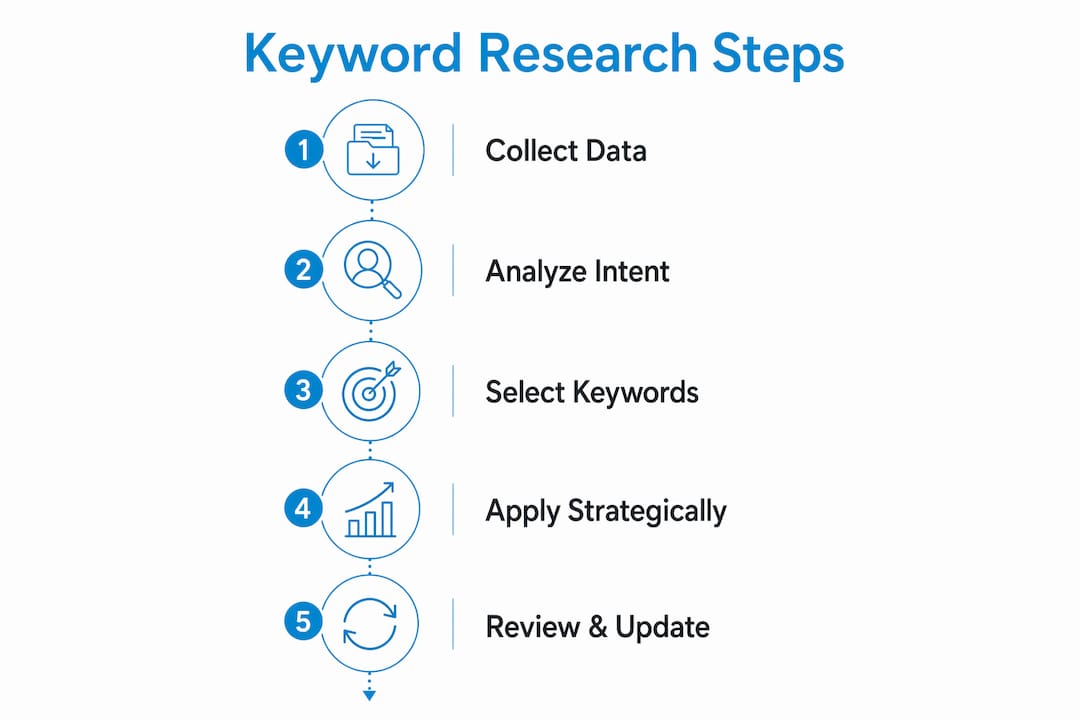
Effective keyword selection follows a repeatable process. Skipping steps leads to a list that looks good in a spreadsheet but fails to drive revenue. Starting with 10–20 core keywords tied directly to your revenue goals is more effective than chasing hundreds of loosely related terms.
Follow these steps in order:
- Brainstorm seed keywords. List your core products, services, and the problems they solve. Use the customer language you gathered from reviews and call notes.
- Expand with a keyword tool. Enter each seed keyword and collect related terms, questions, and long-tail variations. Note search volume and keyword difficulty for each.
- Filter by relevance first. Remove any term that does not directly relate to what you sell or serve. High volume means nothing if the searcher has no reason to buy from you.
- Check competition. Low-difficulty keywords with moderate volume are the best targets for small business sites with limited authority. High-difficulty terms require significant content investment and time.
- Assess business value. Ask: if this keyword ranks, does it bring buyers or just browsers? Transactional and commercial terms score higher here.
- Analyze content gaps. Review the top-ranking pages for your target keywords. Identify topics they cover poorly or miss entirely. Those gaps are your ranking opportunities.
When comparing keywords, track these three metrics side by side:
| Metric | Why it matters | Small business target |
|---|---|---|
| Search volume | Shows demand size | Moderate volume, not maximum |
| Keyword difficulty | Predicts ranking effort | Low to medium for new sites |
| Business relevance | Predicts conversion potential | High, non-negotiable |
How to place keywords on your website for maximum SEO impact
Comprehensive topical coverage outperforms keyword density every time. Modern SEO rewards pages that answer every reasonable question a searcher might have about a topic. Stuffing a keyword 20 times into a page signals spam, not authority.
Each page on your site should target one primary keyword and a small cluster of closely related terms. This focus prevents two pages from competing against each other for the same query, a problem called keyword cannibalization. Assign keywords to pages before you write or update content.
Placement priorities for each page:
- Title tag: Include the primary keyword naturally within the first 60 characters.
- Meta description: Use the keyword once and write a description that earns the click.
- H1 heading: Match or closely mirror the title tag keyword.
- First 100 words: Use the primary keyword in the opening paragraph.
- Subheadings (H2/H3): Use related terms and question variants naturally.
- Body text: Cover the topic fully. Use synonyms and related phrases rather than repeating the exact keyword.
- Image alt text: Describe the image accurately and include the keyword when it fits naturally.
- URL slug: Keep it short and include the primary keyword.
Site performance directly affects how well your keyword work pays off. Pages that load under 2 seconds are 40% more likely to be referenced by AI search tools. Speed is not a bonus feature. It is a ranking factor. Content freshness matters equally. Updating content within the last 30 days makes a page 3x more likely to be cited by AI search engines compared to older content.
Pro Tip: Set a quarterly calendar reminder to review your top 10 pages. Update statistics, add new examples, and check that the content still matches current search intent. Fresh pages consistently outperform stale ones in both traditional and AI-driven search.
Internal linking also reinforces your keyword strategy. When you link from one page to another using descriptive anchor text, you signal to Google which pages are authoritative on which topics. A local service page, for example, should receive internal links from related blog posts using keyword-rich anchor text.
What keyword research mistakes do small businesses make most often?
The most damaging mistake is ignoring search intent. A page can have perfect technical SEO, strong backlinks, and a well-researched keyword, yet still fail to rank because it answers the wrong question. Intent alignment is not optional.
Other common mistakes include:
- Chasing high-volume keywords without checking competition. A term with 50,000 monthly searches dominated by national brands is not a realistic target for a new small business site.
- Using the same keyword on multiple pages. This splits your ranking signals and confuses Google about which page to show.
- Skipping real customer language. Keyword tools reflect aggregate data. Your customers may use specific phrases that tools undercount but that convert at high rates.
- Never updating content. A page written in 2022 with no updates signals to search engines that the information may be outdated.
- Targeting too many keywords at once. Spreading effort across 200 keywords with no focus produces weak results across the board.
| Mistake | Recommended fix |
|---|---|
| Ignoring intent | Run incognito searches before finalizing any keyword |
| Targeting only high-volume terms | Prioritize low-difficulty, high-relevance keywords |
| Keyword cannibalization | Map one primary keyword per page before writing |
| Outdated content | Schedule quarterly content reviews and updates |
| Skipping customer language | Audit reviews, calls, and support tickets regularly |
Avoiding these mistakes is covered in depth in Seotonic’s guide to common SEO mistakes small businesses make, which pairs well with any keyword research process.
Key takeaways
Effective keyword research for a small business website requires matching real customer language to search intent, selecting a focused list of 10–20 revenue-relevant terms, and placing them correctly across well-structured, fast-loading pages.
| Point | Details |
|---|---|
| Start with customer language | Mine reviews, calls, and support notes before opening any keyword tool. |
| Classify by intent first | Run incognito searches to confirm content format before targeting a keyword. |
| Keep your list focused | Target 10–20 high-priority keywords tied directly to revenue goals. |
| Place keywords with purpose | Cover title tags, H1, first 100 words, alt text, and URL slugs for each page. |
| Refresh content regularly | Updated pages are 3x more likely to be cited by AI search engines. |
Why I think most small businesses approach keyword research backwards
After working on SEO campaigns across dozens of industries, I keep seeing the same pattern. Small business owners open a keyword tool on day one, find a high-volume term, and build their entire content plan around it. The intent check comes last, if it comes at all. That sequence is backwards, and it costs months of wasted effort.
The right starting point is always the customer, not the tool. I have seen a local plumbing company rank on page one within 90 days simply by pulling exact phrases from their Google reviews and building service pages around those terms. No expensive tools. No complex analysis. Just real language matched to real intent.
The other shift I push hard on is thinking about AI search visibility alongside traditional rankings. Keywords that perform well in traditional search also perform in AI search engines, but you need to measure both types of visibility now. AI tools like Perplexity and ChatGPT are sending measurable referral traffic, and that traffic will only grow. If your content is not structured to be cited, you are leaving visibility on the table.
My honest advice: start small, stay focused, and treat keyword research as a monthly habit rather than a one-time project. The businesses that win in search are the ones that review, update, and refine continuously. The ones that lose set it and forget it.
— Anil
How Seotonic can support your keyword and SEO strategy
Keyword research is the foundation, but turning it into rankings requires consistent execution across content, technical SEO, and site structure.
Seotonic has delivered more than 3,000 SEO campaigns across global markets, with a specific focus on helping small businesses compete in crowded search results. The team covers everything from initial keyword mapping to on-page optimization, content creation, and SEO for small business growth. Whether you are starting from scratch or fixing a strategy that has stalled, Seotonic’s data-driven approach connects keyword research directly to revenue outcomes. Learn more about how SEO drives business growth and what a structured campaign looks like for a site at your stage.
FAQ
What is keyword research for a small business website?
Keyword research for a small business website is the process of identifying the search terms your customers use and selecting the most relevant ones to target with your content and pages. The goal is to attract visitors who are already looking for what you sell.
How many keywords should a small business target?
Start with 10–20 keywords directly tied to your core products or services. A focused list produces faster, more measurable results than spreading effort across hundreds of loosely related terms.
How do you check the intent behind a keyword?
Search the keyword in incognito mode and look at the top five results. The dominant page type, whether blog post, product page, or service page, tells you exactly what content format Google expects for that query.
Why does content freshness matter for keyword rankings?
Pages updated within the last 30 days are significantly more likely to rank well and be cited by AI search tools. Regular content reviews keep your pages competitive as search intent and competitor content evolve.
What is the biggest keyword research mistake small businesses make?
Ignoring search intent is the most common and costly mistake. Even technically sound pages with strong backlinks will not rank if the content does not match what the searcher actually wants to find.