
Google Shopping SEO is the process of optimizing your product data feed so Google’s AI-powered Shopping Graph matches your listings to buyer searches, placing your products in front of shoppers who are ready to buy. Unlike traditional SEO, where you optimize web pages with keywords, Shopping SEO lives inside your product feed. The ranking signals are your title structure, attribute completeness, price competitiveness, and data consistency across Google Merchant Center, your website, and third-party reviews. Get those right, and you compete for both free organic placements and paid Shopping ads from the same foundation.
How google shopping SEO works at the feed level
Google Shopping SEO works by feeding structured product data into Google Merchant Center, where Google’s algorithms evaluate it for relevance, quality, and trustworthiness before deciding where your product appears. The industry term for this system is feed-first optimization, and it is fundamentally different from traditional on-page SEO. You are not writing meta descriptions. You are building a machine-readable product catalog that Google can parse, score, and match to search queries in real time.
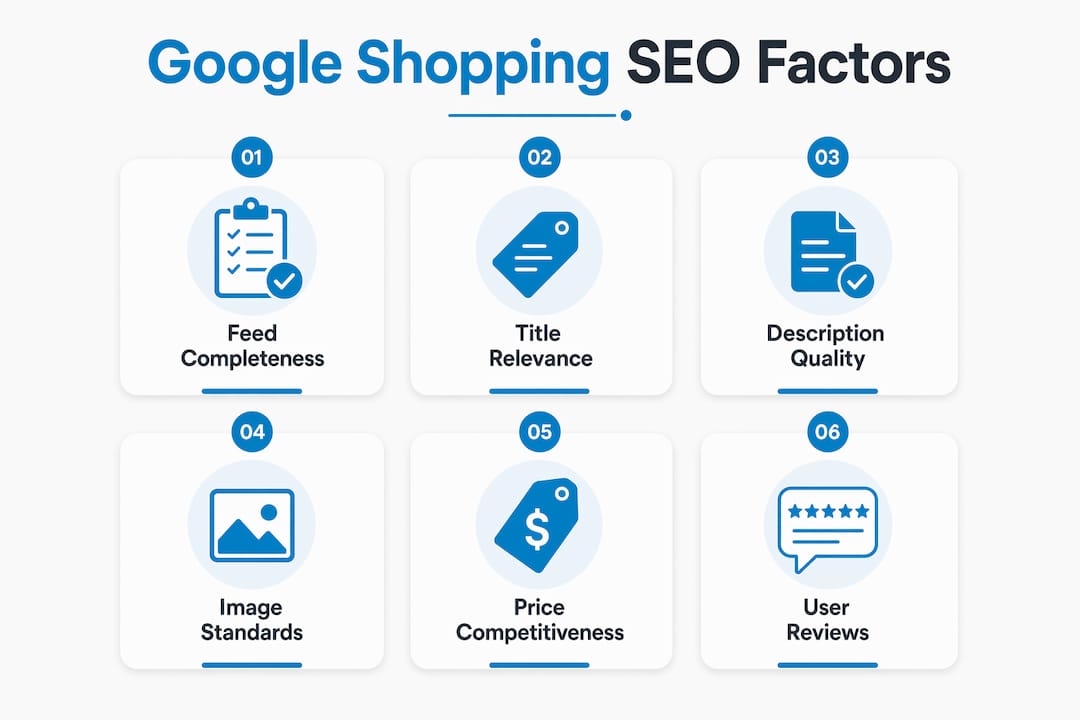
Feeds achieving 90%+ attribute completion receive preferential placement in Shopping auctions. That single stat tells you everything about where to focus your effort. Incomplete feeds do not just rank lower. They lose auction eligibility entirely for certain queries.
Google evaluates your feed across five core dimensions: title relevance, description quality, image standards, product identifiers (GTIN, MPN, brand), and category mapping accuracy. Each dimension contributes to a quality score that determines both your organic visibility in the Shopping tab and your ad placement competitiveness. Better data quality raises that score across both channels simultaneously.

How does the google shopping graph rank products?
The Google Shopping Graph is not a static product database. It is a connected intelligence layer that pulls data from multiple sources and updates continuously based on live signals. Google describes it as the world’s most comprehensive dataset of product information, and it functions more like a knowledge graph than a traditional index.
The Shopping Graph pulls data from your Merchant Center feed, direct website crawls, user reviews on platforms like Google Customer Reviews, and engagement signals such as click-through and conversion patterns. Data consistency across all those sources is not optional. If your feed says a product costs $49 but your website shows $54, the Graph flags the discrepancy and your ranking drops.
Google’s Shopping Graph integrates live user behavior data like click-through and conversion patterns to dynamically adjust product ranking over time. This means a product that earns strong clicks and conversions builds ranking momentum organically, similar to how backlinks compound in traditional SEO. The implication is clear: early feed quality drives early clicks, and early clicks drive long-term ranking gains.
Price competitiveness and product reviews act as trust signals that affect both organic and paid Shopping listings. A product with 200 reviews and a price within 5% of the category median will consistently outrank a technically identical product with no reviews and a premium price, even if the premium product has a better-optimized title.
Pro Tip: Sync your Google Customer Reviews program with your Merchant Center account. Reviews collected through Google’s own program carry more weight in the Shopping Graph than third-party review imports.
How do you optimize product titles and descriptions?
Product title structure is the single highest-leverage optimization in Google Shopping. Google prioritizes the first 70 characters of a product title, following a hierarchy of Brand + Product Type + Key Attributes + Size/Color. That structure is not a suggestion. It is the template Google’s algorithm uses to parse relevance.
Here is the correct sequence for building a high-performing title:
- Brand name first. Google uses brand as a primary identity signal, and shoppers scan for it immediately.
- Product type second. Be specific. “Running Shoe” outperforms “Shoe” for relevant queries.
- Key attributes third. Material, gender, use case, or technology. “Waterproof” and “organic” are not just descriptors. They are query match targets.
- Size and color last. These filter queries but rarely drive top-of-funnel discovery.
Adding high-intent modifiers like “waterproof,” “organic,” or “unisex” in product titles outperforms generic titles by 2.3x in conversion tests. That gap exists because modifiers match the exact language buyers use when they are close to purchasing. Generic titles match broad queries but attract low-intent traffic.
Product descriptions serve a different function. They do not appear in the Shopping tile, but Google crawls them for additional relevance signals. Write the first two sentences for the Shopping Graph, not for humans. State the product category, primary use case, and two or three key attributes in plain language. Then write the remainder for the buyer who clicks through to your product page.
Pro Tip: Pull your top-converting search terms from Google Ads search term reports and insert those exact phrases into your product titles and descriptions. This closes the loop between what buyers type and what your feed says.
Custom labels are an underused title-adjacent tool. You can assign up to five custom label columns in your feed to tag products by margin tier, seasonality, or funnel stage. Those labels do not affect ranking directly, but they let you segment feeds by margin tier and build campaign architectures that allocate budget where your return on ad spend is highest.
What are the technical requirements for feed management?
Feed submission method matters more than most marketers realize. Google Merchant Center supports XML, CSV, Google Sheets, Content API, and direct platform integrations for real-time product data syncing. Each method has a different latency profile. Here is how they compare:
| Submission Method | Update Frequency | Best For |
|---|---|---|
| XML / CSV file | Daily scheduled fetch | Catalogs under 5,000 SKUs |
| Google Sheets | Manual or scheduled | Small catalogs, rapid testing |
| Content API | Real-time | Large catalogs, dynamic pricing |
| Platform integrations (Shopify, WooCommerce) | Near real-time | Mid-size stores on major platforms |
The Content API is the gold standard for large catalogs because it pushes updates the moment your inventory or price changes. Stockouts are a ranking penalty. If a product goes out of stock and your feed still shows it as available, Google will suppress the listing and that suppression affects your overall account health score.
Key feed management practices that protect your ranking:
- Run Merchant Center Diagnostics weekly. The Diagnostics tab flags disapproved products, missing attributes, and policy violations. Each disapproval removes a product from all placements until resolved.
- Use supplemental feeds for attribute enrichment. Your primary feed handles core data. A supplemental feed lets you add custom labels, sale prices, or corrected GTINs without rebuilding the entire primary feed.
- Implement structured data markup on product pages. Schema.org Product markup on your website gives Google a secondary data source to validate your feed. Consistency between the two sources strengthens your trust score in the Shopping Graph.
- Segment by margin tier using custom labels. Tag high-margin products with a “priority” label and build separate Performance Max asset groups around them. This prevents your budget from being diluted across low-margin SKUs.
Feed management tools like Feedonomics and DataFeedWatch automate error detection and multi-channel feed distribution. For catalogs above 10,000 SKUs, manual feed management is not practical. These platforms also support e-commerce SEO practices like bulk title rewriting and attribute mapping at scale.
How is google shopping SEO different from traditional SEO and paid ads?
Traditional SEO and Google Shopping optimization share a goal but use completely different mechanics. Understanding the distinction prevents you from applying the wrong tactics in the wrong channel.
| Factor | Traditional SEO | Google Shopping SEO | Paid Shopping Ads |
|---|---|---|---|
| Primary signal | Page content and backlinks | Product feed data quality | Bid amount plus feed quality |
| Keyword control | Direct keyword targeting | Inferred from feed attributes | Negative keywords plus feed |
| Ranking lever | Content, authority, links | Title, attributes, price, reviews | Bid, Quality Score, feed |
| Organic placement | Yes | Yes (free listings) | No (paid only) |
| Speed to results | Weeks to months | Days to weeks | Immediate |
The most important distinction is that Google Shopping organic listings are free and available globally. You do not need to run ads to appear in the Shopping tab. A well-optimized feed earns organic placements on its own. Paid Shopping ads through Performance Max campaigns then amplify that visibility by adding bid-driven auction placement on top of the organic foundation.
On-page SEO and structured data markup are complementary but distinct from feed optimization. Your product page schema validates your feed data. Your page speed and mobile experience affect conversion rates after the click. But neither replaces feed quality as the primary ranking driver in Shopping. Marketers who treat Shopping SEO as an extension of their regular SEO program consistently underinvest in feed quality and overpay for ads to compensate.
Understanding Google’s AI mode and how it surfaces product results is increasingly relevant here. As Google integrates generative AI into search results, well-structured product data feeds become the input layer for AI-generated shopping recommendations, not just traditional Shopping tiles.
Key takeaways
Google Shopping SEO success depends on feed data quality above all else. Every ranking signal, from title structure to review count, flows through the product feed you submit to Google Merchant Center.
| Point | Details |
|---|---|
| Feed completeness drives placement | Feeds with 90%+ attribute completion earn preferential auction placement and higher impression share. |
| Title structure is non-negotiable | Lead with Brand + Product Type + Key Attributes in the first 70 characters to match Google’s parsing hierarchy. |
| Data consistency across channels | Your feed, website, and reviews must show identical pricing and product details to maintain Shopping Graph trust scores. |
| Organic and paid share the same foundation | A well-optimized feed improves both free Shopping tab listings and Performance Max ad performance simultaneously. |
| Feed segmentation multiplies ROI | Custom labels by margin tier let you concentrate ad spend on products where return on ad spend is highest. |
What i’ve learned after optimizing hundreds of shopping feeds
Most e-commerce teams treat their product feed like a one-time setup task. They upload it, connect it to Google Ads, and move on. That is the single most expensive mistake I see in Shopping SEO.
The Shopping Graph is a living system. Google’s AI adjusts rankings based on real-time engagement, price changes, and review velocity. A feed that performed well in January can lose 30% of its impression share by March if a competitor drops prices, earns 50 new reviews, or simply refreshes their titles with better modifiers. Feed maintenance is a continuous operation, not a launch task.
The tension between automation and manual optimization is real. Tools like Feedonomics handle bulk updates efficiently, but they cannot replicate the judgment call of a human who reads search term reports and notices that “kids waterproof hiking boot” is converting at twice the rate of “children’s outdoor boot.” That insight needs to go back into the feed manually. The best-performing accounts I have worked with combine automated feed management for scale with weekly manual audits for precision.
One overlooked opportunity: most marketers optimize for the Shopping tab but ignore the impact of SEO on e-commerce holistically. Your Shopping feed data, your product page schema, and your organic search rankings all reinforce each other. When all three are aligned, you capture multiple placements on the same search results page, which compounds your visibility in ways that no single channel optimization can match.
The future of Shopping SEO is feed quality as AI input. As Google’s generative AI surfaces product recommendations directly in search answers, the brands with the richest, most accurate product data will appear in those answers. Start treating your feed like a content asset, not a technical requirement.
— Anil
How Seotonic can improve your google shopping performance
Seotonic has managed Google Shopping ad campaigns and feed optimization strategies for e-commerce businesses across more than 3,000 global campaigns over 20 years. The team handles the full stack: feed audits, title rewrites, attribute enrichment, Merchant Center Diagnostics resolution, and Performance Max campaign architecture.
For businesses that want professional support without the overhead of building an in-house feed management team, Seotonic offers affordable SEO services for startups and established e-commerce brands alike. Whether you need a one-time feed audit or ongoing monthly optimization, the team builds strategies around your margin structure and growth targets. Reach out to Seotonic to get a feed health assessment and a clear picture of where your Shopping visibility is leaking revenue.
FAQ
What is google shopping SEO?
Google Shopping SEO is the practice of optimizing your product data feed so Google’s Shopping Graph ranks your listings higher in both organic and paid Shopping placements. It focuses on feed quality, title structure, and attribute completeness rather than traditional keyword targeting.
How do product titles affect google shopping rankings?
Google prioritizes the first 70 characters of a product title using a Brand + Product Type + Key Attributes + Size/Color hierarchy. Titles with high-intent modifiers like “waterproof” or “organic” outperform generic titles by 2.3x in conversion tests.
Do i need google ads to appear in google shopping?
No. Google Shopping organic listings are free and available globally. A well-optimized Merchant Center feed earns placements in the Shopping tab without any ad spend. Paid ads through Performance Max amplify that organic presence but are not required for visibility.
How often should i update my product feed?
Large catalogs with dynamic pricing should update via the Content API in real time. Smaller catalogs can use daily XML or CSV fetches. Stockouts that are not reflected in your feed trigger listing suppression and hurt your overall Merchant Center account health.
What is the google shopping graph?
The Google Shopping Graph is Google’s AI-powered product intelligence system that pulls data from Merchant Center feeds, website crawls, user reviews, and live engagement signals to rank and match products to search queries. Data consistency across all those sources is the foundation of strong Shopping rankings.